English to Marathi Translator
Translate text, use your voice, translate readable PDF text and type
Marathi online — all from one page.
English
Marathi
More Marathi Tools
Choose a tool below. Each section opens on this same page and contains
its own controls and detailed information.
🎙️
Voice Translator
Speak English into your microphone, convert speech to text, then
translate it into Marathi.
📄
PDF Translator
Upload a text-based PDF, extract its readable text in your browser
and translate it into Marathi.
⌨️
Marathi Typing
Type English phonetic sounds and convert common combinations into
Marathi script directly in the browser.
📄 PDF Translator
This works best with PDFs containing selectable text. Scanned or
image-only PDFs may require OCR and may not produce readable text.
PDF Translator: Complete Guide
The PDF Translator is designed for users who have English text inside
a PDF and want to extract that readable text before translating it into
Marathi.
Instead of manually opening a document, selecting individual
paragraphs and copying them into the main translator, the PDF workflow
provides a dedicated place to upload the file, extract its text and
translate the extracted content.
How to Use the PDF Translator
- Choose a PDF file using the upload button.
-
Press
Extract PDF Text
. - Wait while the browser reads the selectable text.
- Review the extracted English text.
-
Press
Translate Extracted Text
. - The Marathi result will appear in the output box.
-
Use
Copy Result
to copy the translated text.
Is the PDF Translator Free?
The PDF text extraction is performed in the browser using the PDF
processing library loaded by the page. There is no separate paid
Google Cloud account required for this PDF interface.
Important:
Translation requests can still be subject to the limits of the
translation service being used. Very large documents may also need to
be processed in smaller sections.
PDF Translator Comparison
| Feature | PDF Translator | Normal Text Translator |
|---|---|---|
| PDF upload | Yes | No |
| Text extraction | Yes for selectable PDF text | No |
| English to Marathi translation | Yes | Yes |
| Scanned PDF | May require OCR | Not applicable |
| Original PDF design | Not automatically reproduced | Not applicable |
| Best for | Readable PDF documents | Normal copied or typed text |
What Type of PDFs Work Best?
Text-based PDFs generally work better because the words are stored as
selectable text. Scanned PDFs are often made from page images, meaning
there may be no actual text for the browser to extract.
Scanned PDFs
If a PDF is a collection of scanned images, an OCR system may be needed
before the text can be translated.
Tables and Complex Layouts
Tables, columns, special formatting and images containing text can
change during text extraction. The current workflow focuses on
extracting readable text rather than reproducing the original PDF
design.
PDF Translator FAQ
Can every PDF be translated?
No. Selectable-text PDFs are supported more directly. Scanned or
image-only PDFs may require OCR.
Do I need Google Cloud?
No separate paid Google Cloud account is required for the PDF
extraction interface.
Will the translated PDF keep the exact original design?
No. The current tool extracts text and displays the translated result
as text. It does not automatically recreate the original PDF layout.
Can large PDFs take longer?
Yes. Larger documents contain more pages and more text, so extraction
and translation can take longer.
🎙️ Voice Translator
Allow microphone access when your browser asks. This tool uses the
speech-recognition feature available in supported browsers.
Voice Translator: Complete Guide
The Voice Translator is designed for people who want to speak instead
of typing. You can use your microphone to speak English, allow the
browser to recognize your speech, and then send the recognized text
through the English to Marathi translation process.
How to Use the Voice Translator
-
Press the
Start Speaking
button. - Allow microphone permission if your browser asks.
- Speak clearly in English.
-
Press
Stop
when you finish speaking. - Check the recognized English text.
-
Press
Translate to Marathi
. -
Use
Read Marathi
if you want the browser to speak the result.
Is the Voice Translator Free?
The voice interface on this page does not require a separate paid
Google Cloud account. Speech recognition itself depends on the browser
and the speech-recognition technology available on the user’s device.
The translation request uses the translation service configured for
the website.
No separate signup for this page:
You can open the tool directly from the website. However, browser
microphone permission may be required before speech recognition can
start, and external translation services can have their own limits.
Voice Translator Comparison
| Feature | Voice Translator | Normal Text Translator |
|---|---|---|
| Typing required | Less typing | Text must normally be entered |
| Microphone | Required for speech input | Not required |
| Speech recognition | Yes, where browser supports it | No |
| English to Marathi translation | Yes | Yes |
| Separate app | Not required for supported browsers | Not required |
| Best for | Spoken sentences and quick input | Typed text and longer written input |
Advantages of Voice Translation
- It can reduce the amount of typing needed.
- It is useful when speaking is easier than typing.
- It can be convenient on mobile devices.
- The recognized speech can be reviewed before translation.
- The Marathi result can be read aloud when supported.
Things to Keep in Mind
Voice recognition is not always perfect. Background noise, microphone
quality, pronunciation, accents and uncommon names can affect the
recognized text.
For this reason, always check the recognized English sentence before
using the final translation for something important.
Voice Translator FAQ
Do I need to install another app?
No separate app is required when your browser supports speech
recognition. You may need to allow microphone permission.
Does it work on every browser?
Speech-recognition support varies by browser and device. If the browser
does not provide the required API, the page will show a support message.
Is the voice translator paid?
The page does not require a paid Google Cloud account for its voice
interface. Translation and browser speech services can have their own
usage limits.
Can I hear the Marathi translation?
Yes, the Read Marathi button uses the browser’s text-to-speech feature
when it is supported.
⌨️ Marathi Typing
Example: type
namaskar
→
नमस्कार
. This is a lightweight
browser transliteration tool, not a full linguistic keyboard.
Marathi Typing: Complete Guide
The Marathi Typing tool is made for users who want to create Marathi
script while using a familiar English keyboard. Instead of requiring a
Marathi keyboard layout, the tool uses simple phonetic combinations to
produce Marathi characters.
For example, typing
namaskar
can produce
नमस्कार
. The
tool is intended for simple everyday writing and quick Marathi text
creation.
How to Use Marathi Typing
- Click inside the English typing box.
- Type Marathi words using familiar English keyboard sounds.
- The Marathi output appears automatically.
- Review the generated Marathi text.
-
Press
Copy Marathi
to copy the result.
Is Marathi Typing Free?
The typing conversion included on this page runs directly in the
browser. It does not require a separate paid Google Cloud account or
a separate signup for the typing interface.
Simple and lightweight:
This is a basic phonetic transliteration system. It is useful for
common words and everyday writing, but it is not intended to replace a
complete professional Marathi input method.
Marathi Typing Comparison
| Feature | Marathi Typing | Normal Marathi Keyboard |
|---|---|---|
| English keyboard | Yes | Depends on keyboard layout |
| Marathi script output | Yes | Yes |
| Separate installation | No | May require keyboard setup |
| Internet service required | The conversion runs in the page | Depends on the input method |
| Best for | Simple everyday Marathi typing | Advanced Marathi typing |
Who Can Use Marathi Typing?
- People who do not have a Marathi keyboard configured.
- Students writing short Marathi notes.
- Users creating simple Marathi messages.
- People learning Marathi script.
- Users who prefer phonetic typing.
Limitations of Phonetic Typing
Phonetic spelling can sometimes be ambiguous. The same English keyboard
spelling may be interpreted in different ways, and uncommon words may
not produce the exact Marathi spelling expected by the user.
For important or professional Marathi writing, the generated result
should therefore be reviewed before publishing.
Marathi Typing FAQ
Is Marathi Typing free?
The included browser typing conversion does not require a paid Google
Cloud account or a separate signup.
Do I need a Marathi keyboard?
No. The tool is designed to let you type using familiar English
keyboard characters.
Does it translate English into Marathi?
No. Marathi Typing is different from translation. It converts phonetic
keyboard input into Marathi script.
Is the typing result always perfect?
No. It is a lightweight phonetic transliteration system, so uncommon
or ambiguous spellings may need manual correction.
How to Translate English to Marathi in Three Simple Steps
Behind a very simple screen, language models compare patterns across huge collections of bilingual text and choose the Marathi phrasing that best fits your sentence. Here is the short version of what you do.
1. Add Your English
Type, paste, speak or upload. Short phrases and long passages are both welcome.
2. Let It Translate
The engine reads the whole sentence for context instead of swapping words one by one.
3. Copy and Use
Your Devanagari output is ready to copy into a message, document or presentation.
Everyday English Phrases with Their Marathi Meaning
A handful of ready-made lines covers most daily situations, from greeting a neighbour to asking a shopkeeper for a price.
| English | Marathi |
|---|---|
| Hello | नमस्कार |
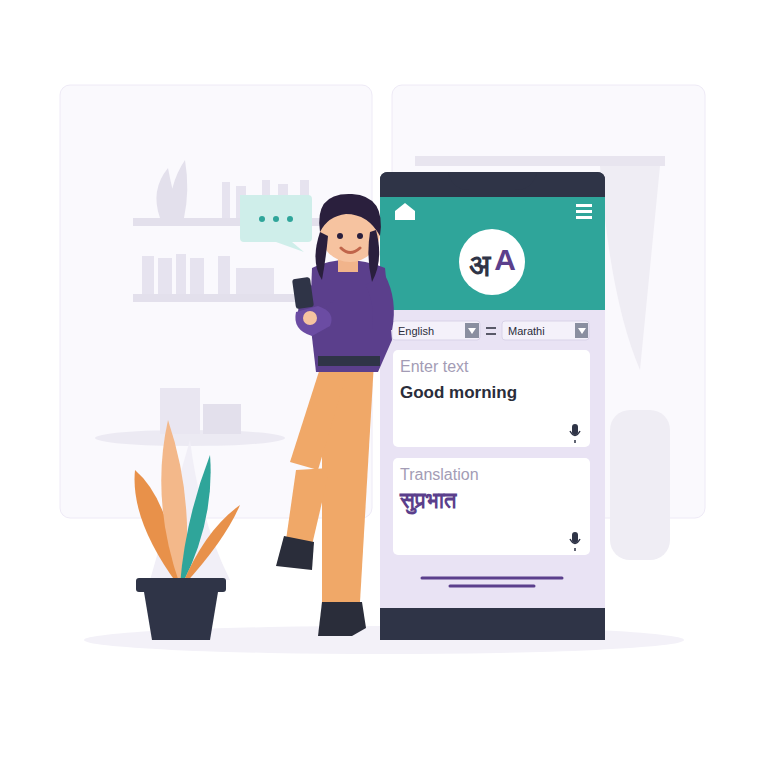
| Good morning | सुप्रभात |
| Thank you | धन्यवाद |
| Welcome | स्वागत आहे |
| Please help me | कृपया मला मदत करा |
| I do not understand | मला समजत नाही |
| Where is the station? | स्टेशन कुठे आहे? |
| How much does this cost? | याची किंमत किती आहे? |
Machine Translation vs Human Translation
Neither option is universally better. The right pick depends on what is at stake.
| Factor | Instant Translator | Professional Human Translator |
|---|---|---|
| Speed | Seconds | Hours to days |
| Cost | Free | Paid per word or page |
| Best for | Messages, study, general reading | Contracts, medical and legal files |
| Cultural nuance | Good, improving steadily | Excellent |
For everyday use, an instant translator is more than enough. For anything legally binding or medically sensitive, treat the output as a draft and have a qualified Marathi reviewer confirm it.
Why So Many People Need to Translate English to Marathi
Marathi is the official language of Maharashtra and the first language of well over 80 million people, making it one of the most widely spoken languages in India. Hospitals, schools, local offices, shops and families across the state conduct daily life in it.
Whenever English content needs to reach those people, translation decides whether your message is understood or ignored. A tenant agreement, a product label, a school circular or a simple greeting for a grandparent all land better in the reader’s own language.
That is the gap this translator closes. It removes the need for dictionaries, agencies and long waits, so everyday communication becomes effortless.
Browser-Based Translation: Nothing to Install, Nothing to Pay
Not long ago, translating a paragraph meant installing heavy software or paying for a subscription. Today everything happens inside your browser tab.
Open the page, enter your text and read the result. The tool works the same on a budget Android phone, a school laptop or an office desktop, and it never asks you to register.
-
Runs on Chrome, Safari, Edge and Firefox -
No profile, password or email required -
Light enough for slow mobile connections -
Fresh results every time, without usage caps
Common Translation Challenges and Simple Fixes
Idioms and Expressions
Phrases like “break the ice” lose meaning when translated literally. Rewrite them in plain English first.
Cultural References
Local festivals, foods and customs may have no English equivalent. Keep the original term and add a short explanation.
Technical Vocabulary
Specialist terms from law, medicine or engineering need review. Keep a small glossary for repeated use.
English to Marathi Translation: A Practical Guide
An English to Marathi translator helps users understand English words,
sentences and everyday information in Marathi. The main translator
above is designed for short and medium pieces of text, while the
additional tools cover speaking, documents and Marathi typing.
Important:
Automatic translation is a useful starting point. For legal, medical,
financial, academic or other important documents, review the result
carefully.
How the Text Translator Works
Enter English in the left box and press Translate. The page sends the
text to the translation service configured for this website and
displays the Marathi result. If the website’s WordPress translation
endpoint is active, it is used first; a free public fallback is
attempted if that endpoint is unavailable.
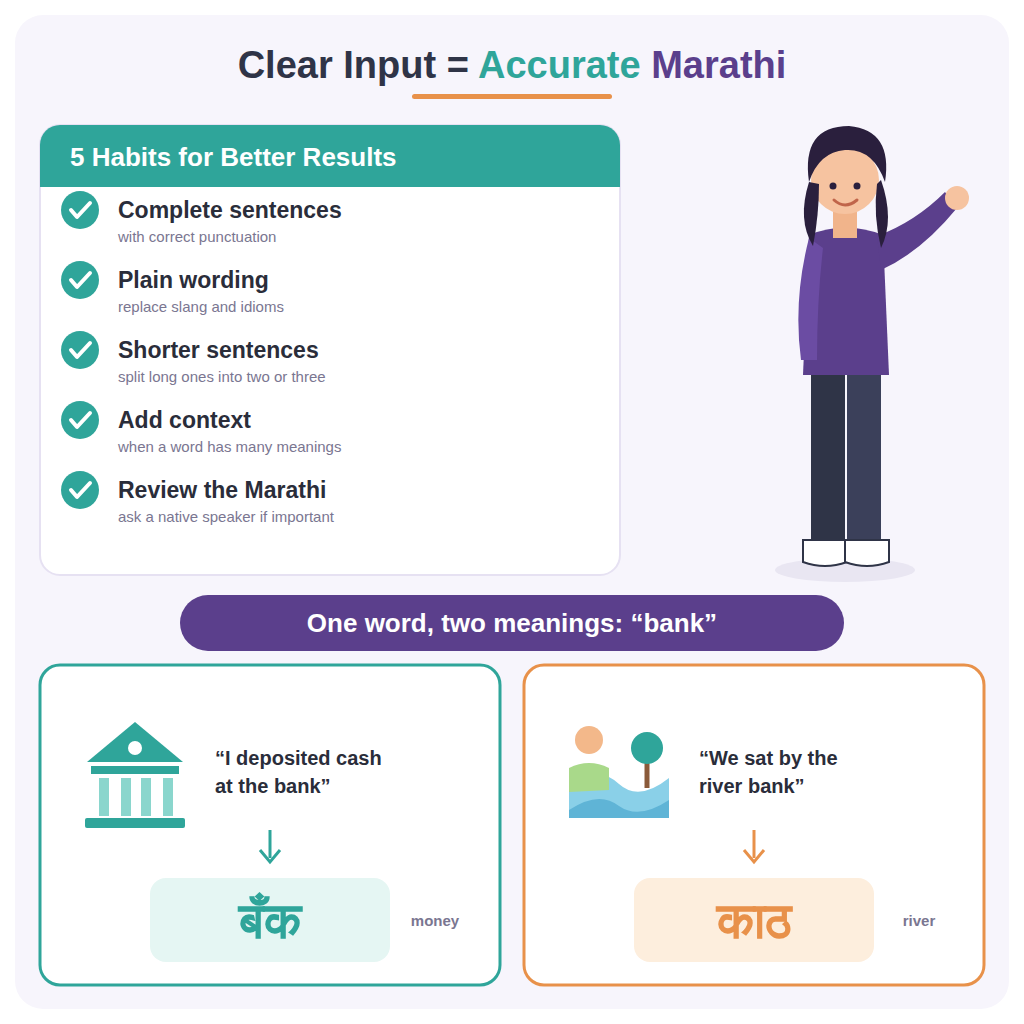
Why Context Matters
A single English word can have several meanings. A complete sentence
gives the translation system more context about grammar and intended
meaning. Names, technical terms and local expressions should also be
checked manually.
Using These Tools on Mobile
The page is responsive, so the translator, voice controls, PDF controls
and typing areas can be used on phones as well as computers. On mobile,
microphone permissions and file access are controlled by the browser
and operating system.
Common Uses
- Understanding English messages and instructions.
- Learning English vocabulary through Marathi meanings.
- Preparing simple multilingual notes.
- Speaking English and checking the Marathi translation.
- Extracting readable text from a PDF for translation.
- Creating Marathi text when a Marathi keyboard is not configured.
Tips for Better Results
Use Clear Sentences
Normal spelling and complete sentences generally provide more useful
input than heavily abbreviated or misspelled text.
Review Names and Specialist Terms
Proper names, company names and technical terminology may need manual
correction.
Check Important Translations
If the information has serious consequences, do not rely on an
automatic result without appropriate human review.
Making Translation Easier for Everyday Tasks
A useful language website can bring several everyday tasks together in one place. Instead of opening separate tools for short text, spoken phrases, documents and Marathi typing, users can choose the option that matches the task they are trying to complete.
For everyday use, it is helpful to keep the original English text available while reviewing the Marathi result. This makes it easier to compare the meaning, notice names or specialist terms that may need correction, and make small edits before copying the final text.
Translation tools can be a convenient starting point for understanding information, learning vocabulary and preparing simple multilingual content. For important material, the final result should still be reviewed carefully because automatic systems can make mistakes with context, unusual expressions and specialized terminology.
Frequently Asked Questions
Is the translator free?
The page itself does not require a paid Google Cloud account. The
translation feature depends on the configured translation endpoint
and its limits.
Does voice translation need a separate app?
No separate app is required when the browser supports speech
recognition, although microphone permission is required.
Can every PDF be translated?
No. The browser can extract selectable text from many PDFs, but
scanned or image-only PDFs may need OCR.
Is Marathi typing perfect?
No. The included tool is a simple phonetic transliterator. For
advanced Marathi typing, a dedicated input method can be more
appropriate.
Can I use the translator on a mobile phone?
The page is designed to work in modern mobile browsers. You can enter text, use supported voice features and work with supported PDF files from a phone.
Do I need to create an account to use these tools?
The basic homepage interface is designed to be simple to use without requiring a separate account. External services can still have their own limits or requirements.